← Floor 4 · Rooftop
PTENES
Room · Irmãos Lacarini · Product design and service design

Digitising the harvest: from lost paper slips to prices applied in bulk

At Irmãos Lacarini, a fig grower and exporter since 1969, every fruit delivery from the sharecropper families was recorded on paper.

Before

Delivery slipand the note I wrote next to it?

where is yesterday’s slip?

Spreadsheet · harvestTyping in every slip, product by product, and pricing item by item.

one slip a day, all lumped together

checking: “accepted as it is”
After
Sharecropper app: delivery slip form that mirrors the paper oneThe family records
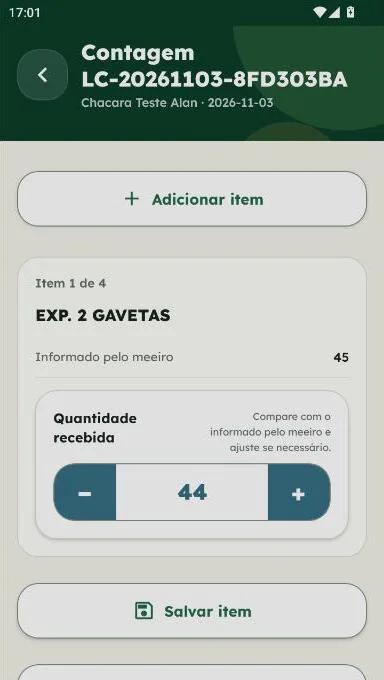
Checker app: count with a discrepancyThe checker counts
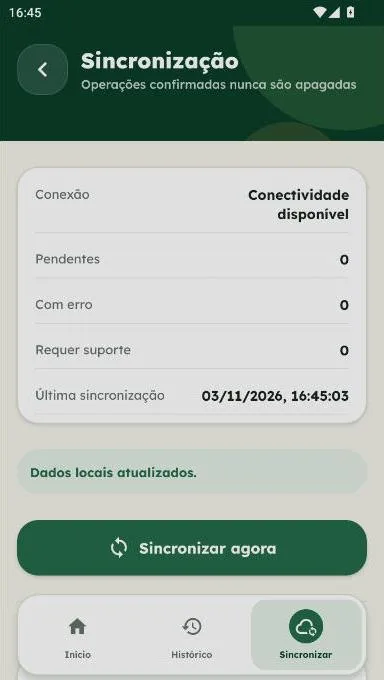
Sync: slips sent even without signalWorks without signal
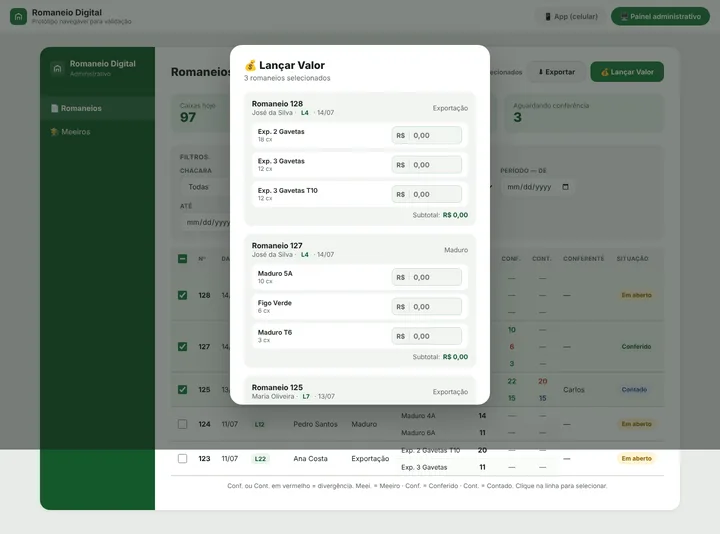
Dashboard: price applied to several slips at onceThe office applies prices in bulk

Delivery slips no longer get lost.

Families record every delivery on their phone, even without an internet signal.

The office no longer types in a single slip.

They arrive ready and checked, and prices are applied with filters that speed up closing.

Families use it every day.

And they are looking forward to the next versions of the app, which will make things even easier for them.

My role
Product designer and service designer: field research, process design, wireframes, development follow-up, rollout and training
Period
July 2026 to date · phase 1 in use
Deliverables
Sharecropper app, checker app and admin dashboard
Users
More than 70 users, from around 35 sharecropper families, aged 18 to over 60
“There would be no point in building an app that speeds up a process that does not exist.”
01 · The mess

Everything relied on trust alone

At Lacarini, the people who plant and harvest are sharecroppers: families who work on the company’s farms and are paid for what they produce. Every fruit delivery generates a delivery slip, the document that says how many boxes of each product left each farm.

That slip was a piece of paper, filled in by hand in the field. And the paper got lost: sometimes before it reached the lorry, sometimes with the driver, sometimes at the checking point itself. When a family wrote a note next to a product, it was hardly ever seen in the rush of receiving the fruit.

At the end of the line, the office typed every slip into a spreadsheet, product by product, and then priced each item to work out how much to pay each family at the end of the month. During the harvest, from October to January, there are around 3 to 4 slips per family per day. The team worked from morning to night to pay on time, because if payment is late, sharecroppers stop producing in the middle of the harvest, and the fruit has orders in Brazil and abroad.

All of this ran on one thing only: trust. Between the family, the checker and the office, there was no shared record.

02 · The discovery

The process on paper was not the real process

The original brief was to digitise the delivery slip. Before designing any screen, I went into the field with the team: I interviewed sharecroppers and checkers and followed the receiving of the fruit on site.

The research showed that the process the company believed existed was not the real one:

  • A slip was supposed to be filled in at every lorry collection. In practice, families did one a day, lumping everything together, precisely to lose less paper.
  • Checking barely existed. Whatever arrived was accepted as written, when the paper arrived at all.

If I had digitised the paper as it was, the app would only have sped up a process that was not happening. The problem was not the screen. It was the service.
The room, renovated

A shared record between the family, the checker and the office.

03 · Process first, then the screen

Three moments, one tool for each

Together with the stakeholders, we reviewed Lacarini’s internal processes one by one and defined how each step should actually work: who records, who checks and who sets the price, and how each of them does it.

We also set rollout dates and stages. The idea was to launch the system without a big impact on people’s routine, so they would trust it before anything else new was added.

  1. In the fieldThe family recordsthe delivery slip in the field, at every collection.
  2. At checkingThe checker countswhat arrived and compares it with what was declared.
  3. In the officeThe office sets the priceand keeps track of what each family is owed.

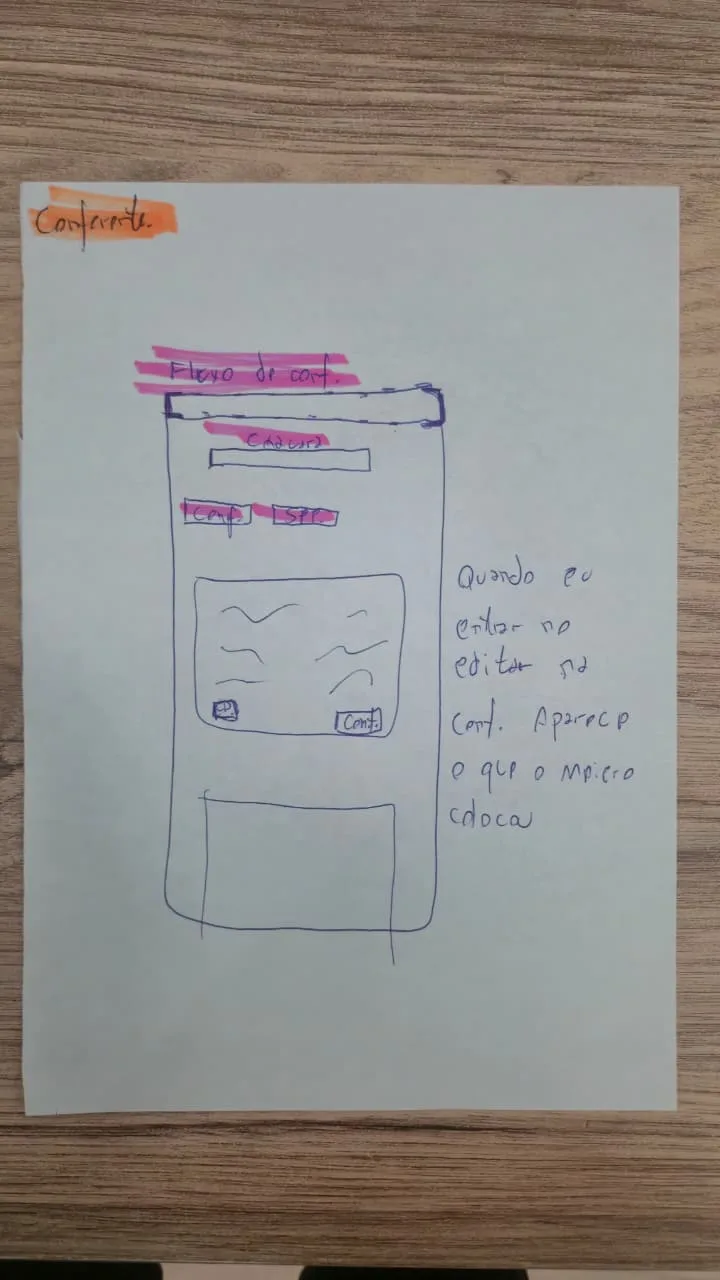
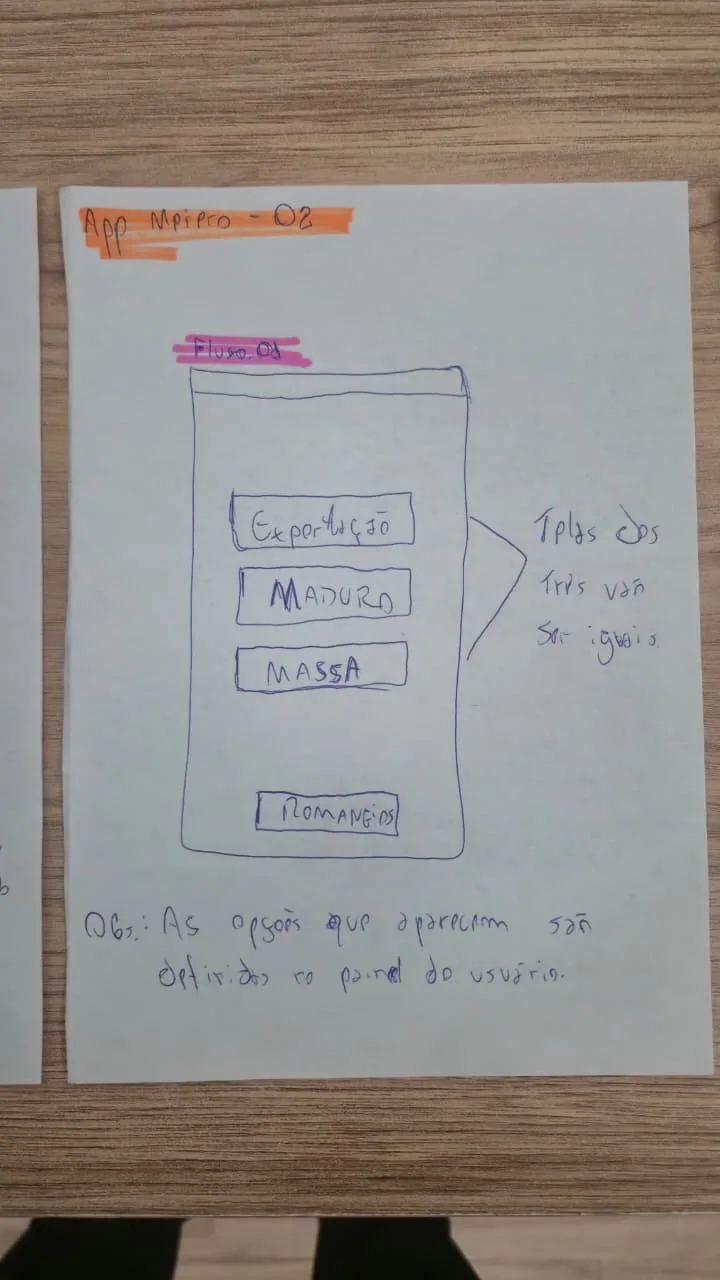
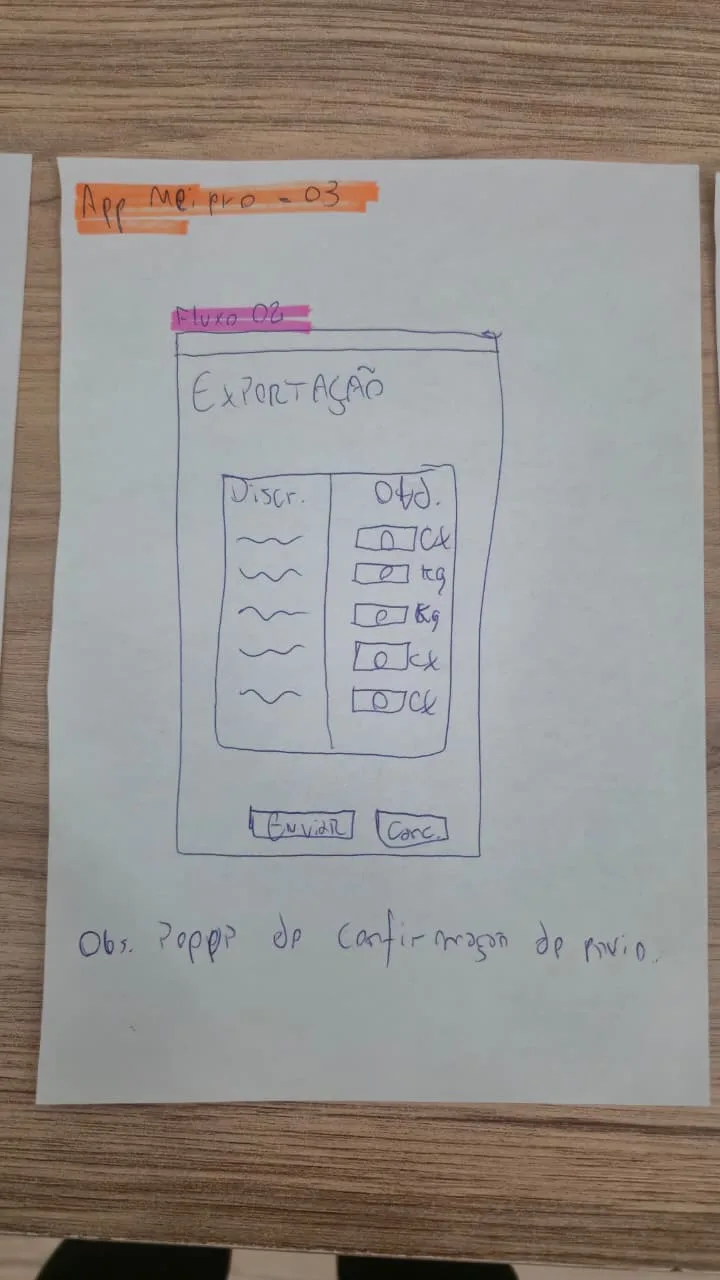
I started on paper. I drew the flows of the three tools by hand, screen by screen, with notes on how each one should behave. Some examples of what was already in those sketches:

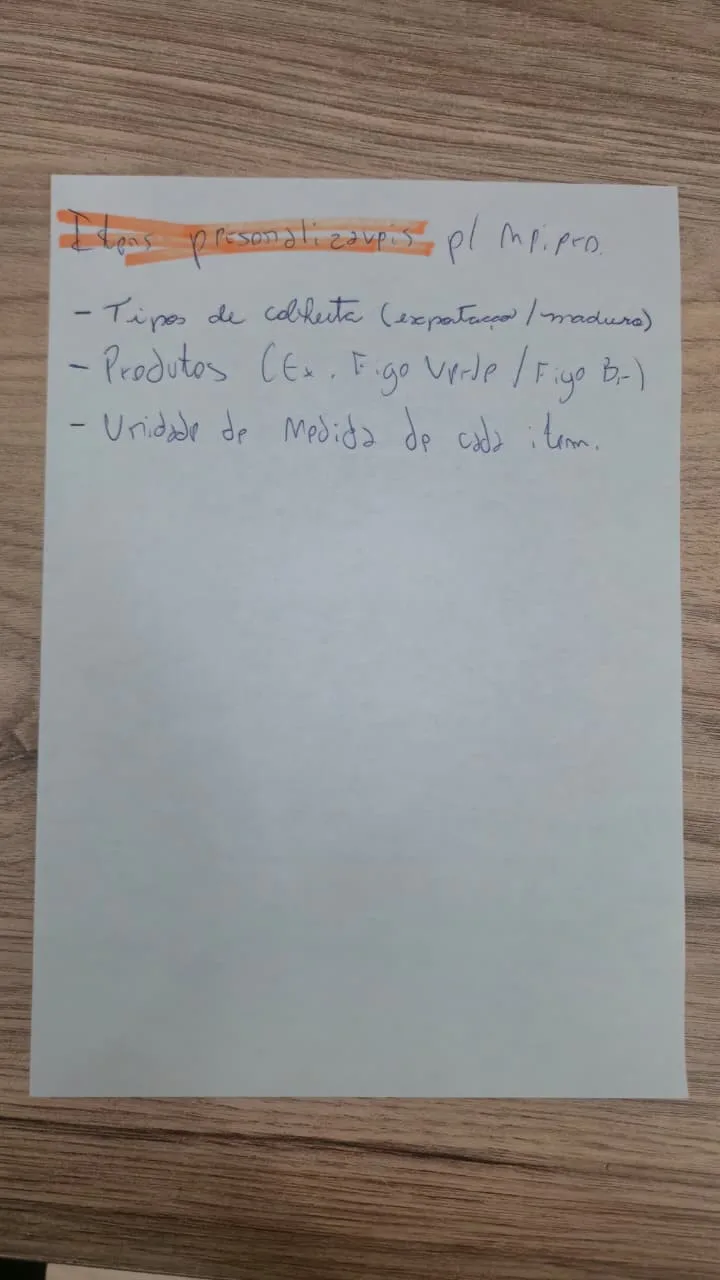
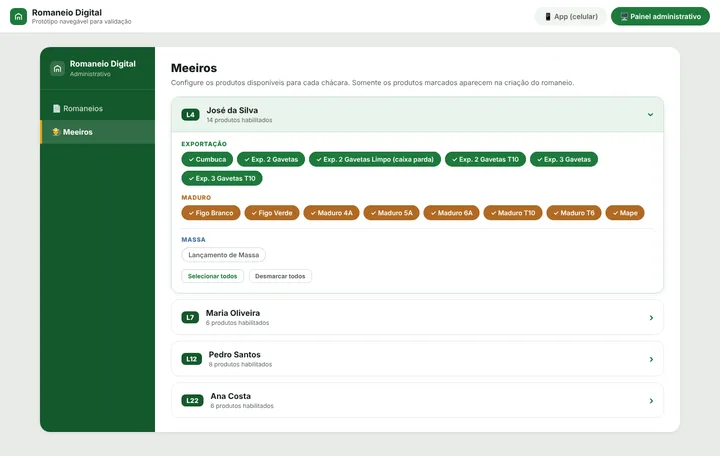
  • Each family only sees what it produces. Harvest types, products and the unit of measure for each item are configured per sharecropper in the dashboard, so nobody has to look for their product in a huge list.
  • Help one tap away, right on the login screen, opening a chat with support.
  • Confirmation before sending the slip.
  • The checker sees what the sharecropper declared while checking.
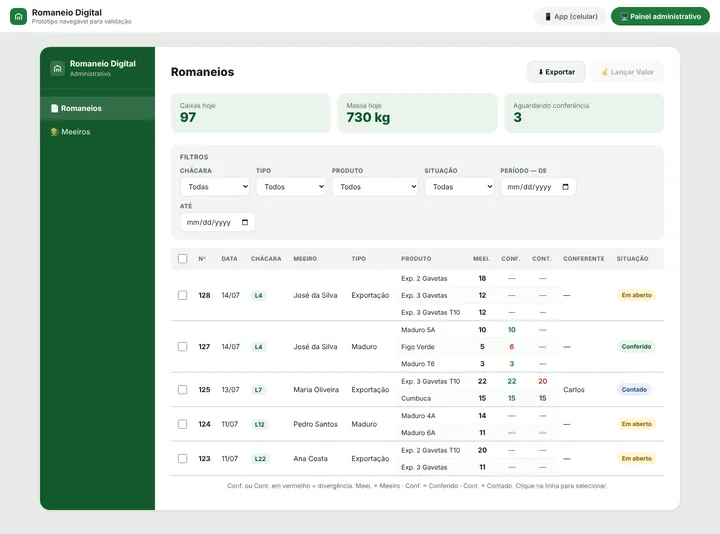
  • Bulk pricing and export already designed into the dashboard, next to the filters.

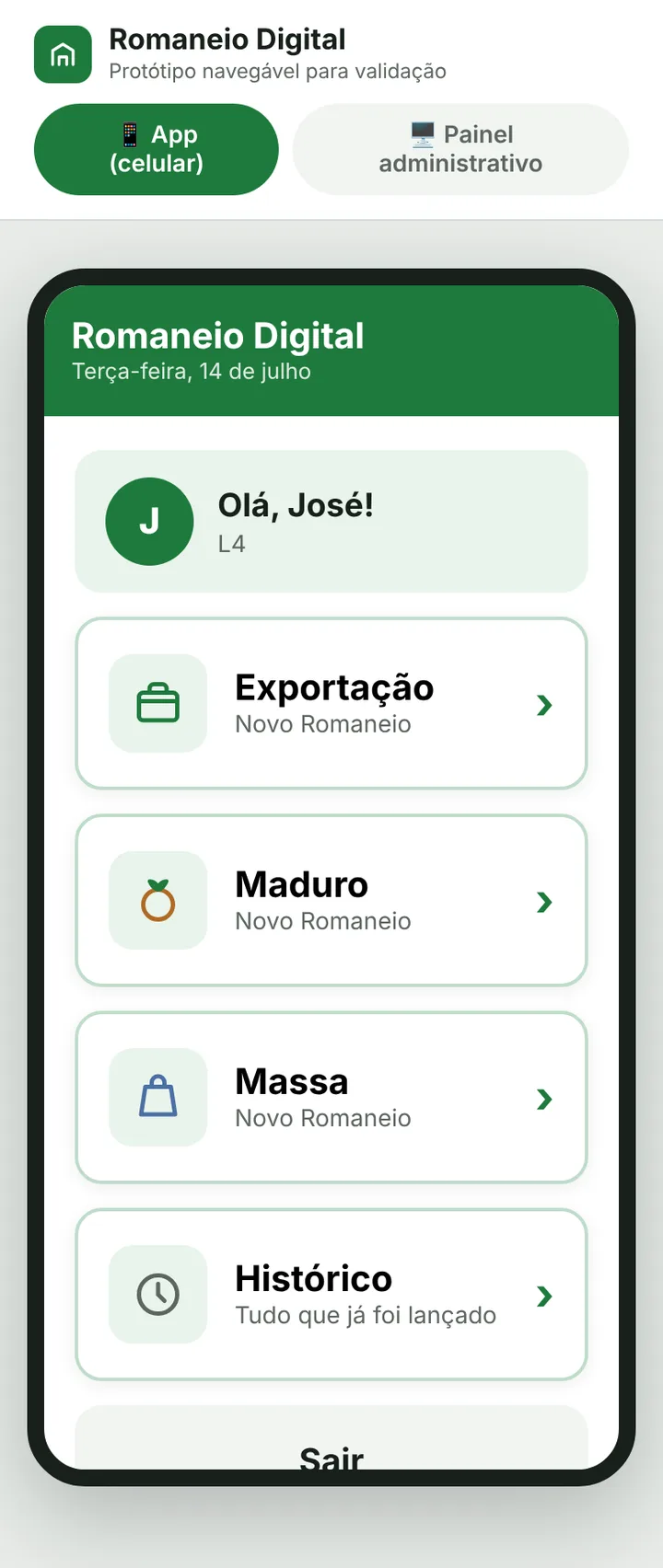
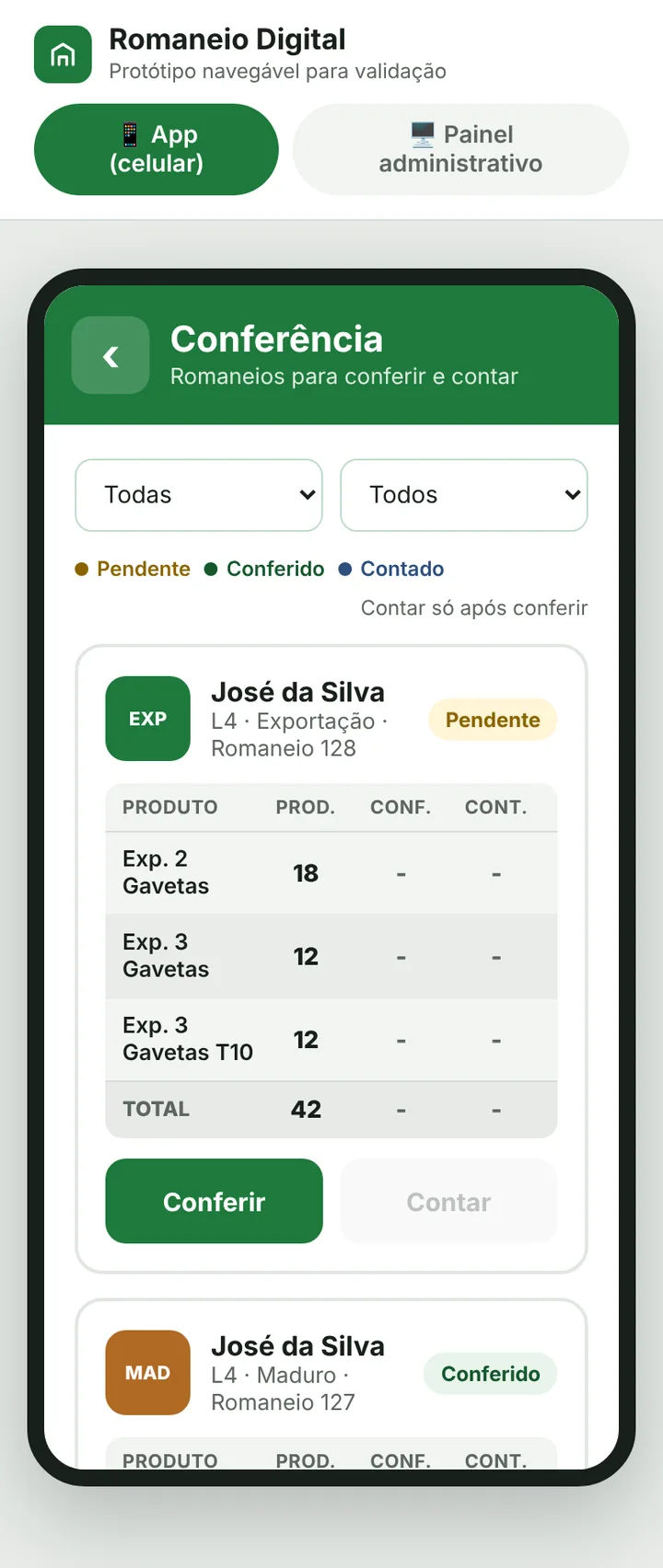
Then, before there was even a developer on the project, I built a clickable prototype of the app and the admin dashboard in Figma Make for the first meetings with the client. With it, everyone could tap through the screens and see the process working: the family entering the slip, the checker comparing counts, the office pricing several slips at once and configuring which products each farm can record. The decisions were validated there, before a single line of final code.

04 · One tool for each step of the service

From the field to the office

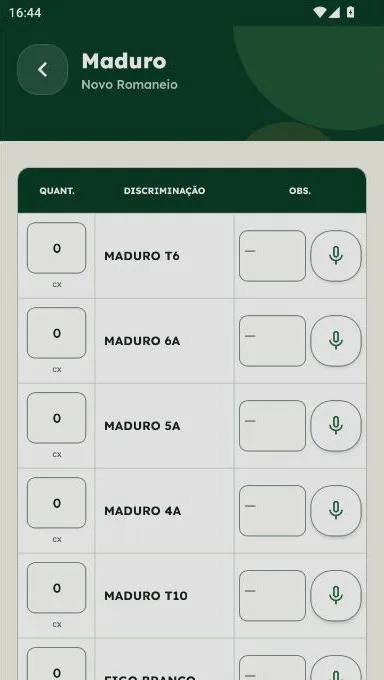
Sharecropper app: form with Quantity, Description and Note
The sharecropper appIt is used by the whole family, from the 18-year-old son to the grandfather over 60. The form mirrors the paper they already knew, with the columns Quantity, Description and Note, and the products already listed. Nobody had to learn a new logic.
Checker app: count showing what the sharecropper declared
The checker appThe checker sees a work queue with the slips waiting to be counted. When counting, the screen shows what the sharecropper declared and pre-fills the received quantity with the same number. The checker only adjusts it with – and + when there is a difference.
Prototype of the admin dashboard with filters
The admin dashboardThe office sees, side by side, what the sharecropper declared, what was received and what was approved on each slip. To set prices, they combine several filters, such as farm, type, product, status and period, and apply the price to several slips at once.
05 · The decisions

Designed for everyday life in the field

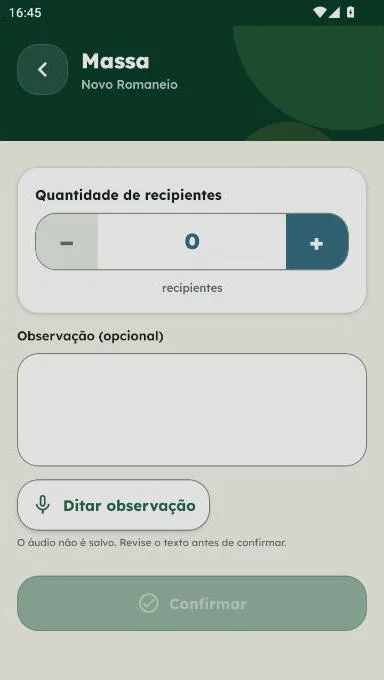
Note dictated by voice in the sharecropper app
Dictate instead of typingIn the field research we saw that it is hard to type on a phone with hands dirty from the harvest, and handwritten notes were ignored in the rush. In the app, every line has a microphone: the family speaks, the text appears and they review it before confirming. The audio is not stored.
Sync screen with pending items
Working without signalIn the field, the internet fails. The slip is saved on the device and sent when there is a connection. The sync screen shows what is pending, what failed and what needs support.
  • SecuritySigning with your own phone

    The count is confirmed with a fingerprint, for security. But fingerprints fail on the hands of someone who has spent the day in the fields, so the phone’s passcode works as an alternative.

  • ControlOne device per person

    Before reaching the app stores, the app was installed via APK. To avoid shared accounts, each user signs in on one device at a time, and changing phones is approved in the dashboard, always with a recorded reason.

  • SupportSupport without repeating questions

    The help screen shows an ID code and the user’s context, so the technician can help quickly.

  • TrustA record of everything, to build trust

    The dashboard keeps an audit trail of every action, with who did it and in what context, without exposing sensitive data, so families, checkers and the office can trust what is in the system.

06 · Trust before speed

First, getting families to trust the app

One of the goals of the first phase was to get families to trust the app. That is why the training was designed to build confidence, and installing the app on the phones was planned in advance.

I defined with the team how the technicians would carry out each installation and created a log where they note each family’s problems and difficulties. With that data and frequent meetings with the technicians, I keep track of what is working and what needs to change.

The families approved it and already use the app every day. More than that, they are excited about the next phases, because they will easily see how much they produce, how much they owe and how much they will receive.

07 · On the same screen

Three versions of the truth on the same screen

by the familyDeclared
by the checkerReceived
by the officeApproved
08 · The next works

The room is not finished yet

The biggest challenge today lies in the checking process itself: the client is still defining and consolidating that routine. I follow each step closely so the results are visible before moving on.

  1. More technology at checking, to speed up counting, once the process has been validated.
  2. Expenses, loans and supplies in the app, so each sharecropper can see how much they owe, how much they are paying and how much they will receive.
  3. A new round of research, looking at the results and the processes we have not tackled yet.
  4. Redesigning the experience (UX) of the flows in the second phase, based on what the research and real use show.
What I learned
  • Before designing a screen, you have to understand how things happen in practice, and there is nothing better for that than observing and talking to the people who actually do the work. The process on paper and the real process are rarely the same.
  • It confirmed my belief that you have to focus on people, understand their environment and take the necessary care when rolling out change. With users’ support and trust, it becomes easier to change and adjust what is needed in a project whose deadline was often under discussion, avoiding rework that takes even more of everyone’s time.
  • To be the bridge between the client and development, you have to design the experience for everyone: understand the process and translate it into something that can be built, then follow up on whether it really works, giving every stakeholder a smooth experience.

Behind the scenes: I designed the project and the screens in low fidelity, and development was done by a programmer. Because of time and scope, the final interface is still an MVP and has not had a full UI pass. Since the first version, I have followed every release and asked for process and interface fixes by priority.